What is an Email Bot ?
Well it's a bot more like our normal website bots, but not exactly the same. In website bots we have a frontend where we interact with. But to communicate with this email bot we must put some mail to the respective brand to get our desired output. So cool, isn't it ? 😎
Environment Setup
To setup EmailBot in your local systems please follow this link ::
https://docs.google.com/document/d/1LGjNtowpzqbh-RAcpRGElGP0hzUwYMDN/edit
How Does It Work ?
Once the user's mail landed on BOT these things will happen…
Miro link - https://miro.com/app/board/uXjVMcXjg5o=/
Step 1 : Session is created
Step 2 : Global checks processing and Authentication via OTP on detected MSISDN
Step 3 : Intent mappings according to customer query mail.
Step 4 : Respective workflow will be triggered and the final generated template will be sent.
Step 5 : Whatever results generated will be stored inside bot results collection of the Database.
Note
Whatever happens during processing of the mail will be stored in emailsessioninfos collection of the Database. for eg.
- AI response
- final template
- failure assisted unhandled reasons with full explanation
- Response mode, controlled response mode
Too much technicality Right, But Before that we will see some of the things that make email BOT so unique. So cool.
Let's dive into it …
Response Modes in Email BOT
In email bot there are a total 3 types of mode. Remember these are the modes based upon which we conclude what is happening with this mail.
1. AUTO
- If everything went well with that mail. We may conclude that, ok this mail is completely handled by BOT. Here, whatever template generated by email bot that can be sent to the customer.
2. AGENT ASSISTED
- AGENT ASSISTED means the mail is not handled 100% by bot itself.
- We send raw templates to the agents. They will further handle this mail and convey it to the end customer.
3. UNHANDLED
- if mail response mode is marked as unhandled means. there are some checks failed / required info not received.
- It will completely remain unhandled from bot side. And should be handled by agents 100%.
Checks Before Processing of Mails
Before we start processing mail there might be a possibility that we need something important information / data from that mail.
For eg : if it is necessary for a mail that must have a phone number then we put checks before processing the mail.
Very simple isn't it ?
Let's see those types of checks one by one.
1. Pre Boundary Checks
- These checks are performed at the very beginning of mail processing, if something fails the whole mail is marked as unhandled from BOT side.
2. Pre Flow Assisted Checks
- It will be triggered just after above checks. These checks are important if something is required and does not come along with mail. what it does, instead of sending that email completely unhandled it will be sent as agent assisted. (which means that mail is somewhere partially handled by BOT itself)
Note
We can specify N number of checks for each type and check the necessary information before email processing.
Let's process a sample mail
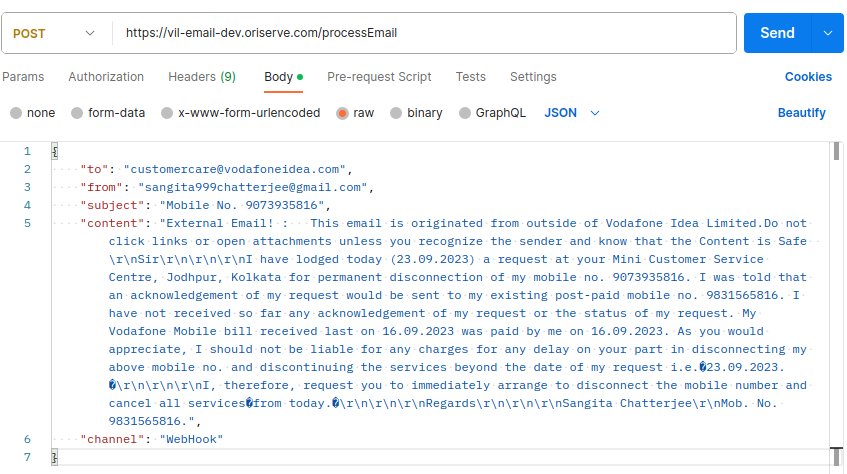
So till now it is very much clear that the user will send his/her query to brand and then brand calls our webhook ( /processEmail ) with this sample request with subject, content, from channel all that mentioned in the body. If any of the data missed mail will be rejected.
Note only WEBHOOK channel is allowed for vodafone email bot as of now. So if our webhook will be called other than WEBHOOK channel mail will be rejected immediately.
So much talking now show it 😴
Sample request :
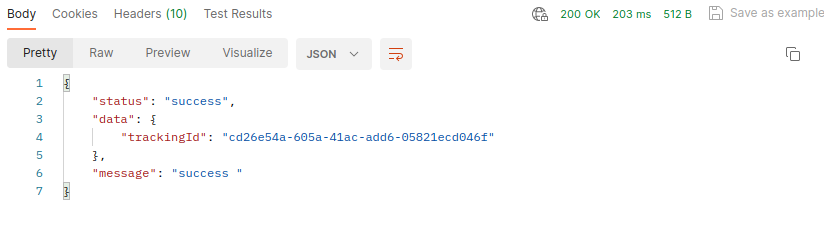
Response:
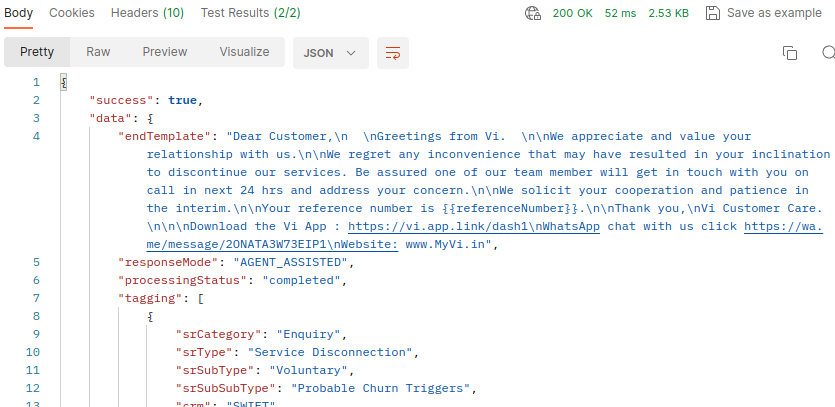
Response of processed Email
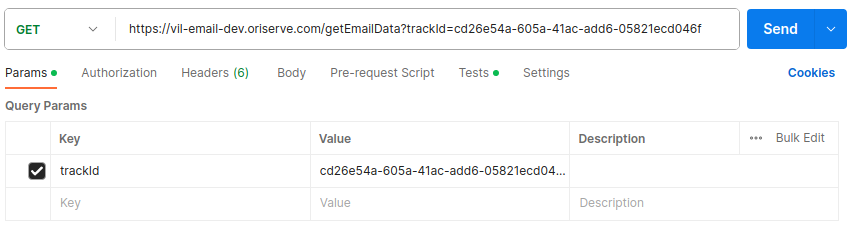
To retrieve the response of a processed email, we utilize the API endpoint /getEmailData. This endpoint can be invoked by including the trackID as a query parameter, which is obtained during the initial mail processing request. Let’s see it with an example.
Sample request :
Response :
Workflows
Please refer to this miro for workflows currently being used inside vodafone email bot.
https://miro.com/app/board/o9J_kjHEUDc=/?fromRedirect=1
API's Used
Please refer to this file for API's currently being used inside vodafone email bot.
Hey! please don't tell anyone about this, it's confidential you know. 🤫
Want to know more ?
To know more about this amazing bot, please follow this link:
https://docs.google.com/document/d/1LGjNtowpzqbh-RAcpRGElGP0hzUwYMDN/edit